Charleston’s small businesses run on cloud POS, telehealth, and 4K file uploads, but many storefronts still have only one or two solid broadband choices. We compared contracts, SLAs, upload speeds, and backup features across eight business-class networks in the metro area using FCC data and provider terms verified August 4, 2026. The result: a use-case-driven ranking that shows who offers symmetrical speed, flexible pricing, and instant 5G failover - so your connection stays live when the next fiber cut hits King Street.
At a glance: Charleston’s top business internet picks
The FCC’s latest Broadband Data Collection lists 14 business-class networks in the Charleston metro, yet only eight combine availability, upload speed, SLA language, and backup features that most cafés, clinics, and creative studios need. We verified every offer on August 4 2026.
| Provider | Edge for businesses | Connection type | Max download / upload* |
|---|---|---|---|
| WOW! Business | Flexible local packages | Cable / up to 5 Gig symmetrical tier | 1.2 Gbps / 60 Mbps · 5 Gbps / 5 Gbps |
| AT&T Business Fiber | Symmetrical shared fiber | Shared fiber | 5 Gbps / 5 Gbps |
| Comcast Business | Broad wired footprint | Cable / limited fiber | 2 Gbps / up to 35 Mbps (cable) · 5 Gbps / 5 Gbps (fiber) |
| IQ Fiber Business | Flat, all-in pricing | 100 percent fiber | 5 Gbps / 5 Gbps |
| Home Telecom Business | Local-support fiber | Fiber | 5 Gbps / 5 Gbps |
| Spectrum Business | Month-to-month cable | Cable | 1 Gbps / 35 Mbps |
| T-Mobile Business Internet | Plug-and-play 5G backup | 5G fixed wireless | No published speed pair** |
| Verizon Business Internet | Wireless static-IP option | LTE / 5G fixed wireless | 100 / 200 / 400 Mbps published tiers** |
*Advertised Charleston maximums; actual tiers vary by address.
** Fixed-wireless throughput depends on signal strength and tower load, so test at the exact spot the gateway will sit before you commit to a tier.
Use this grid as a quick reference. The next sections compare upload guarantees, static-IP pricing, contracts, and automatic failover so you can match the right primary and backup links to your workspace.
How we picked the winners
To compare Charleston business internet providers, we scored each ISP against seven weighted factors drawn from contracts, FCC data, and service guides verified August 4 2026:
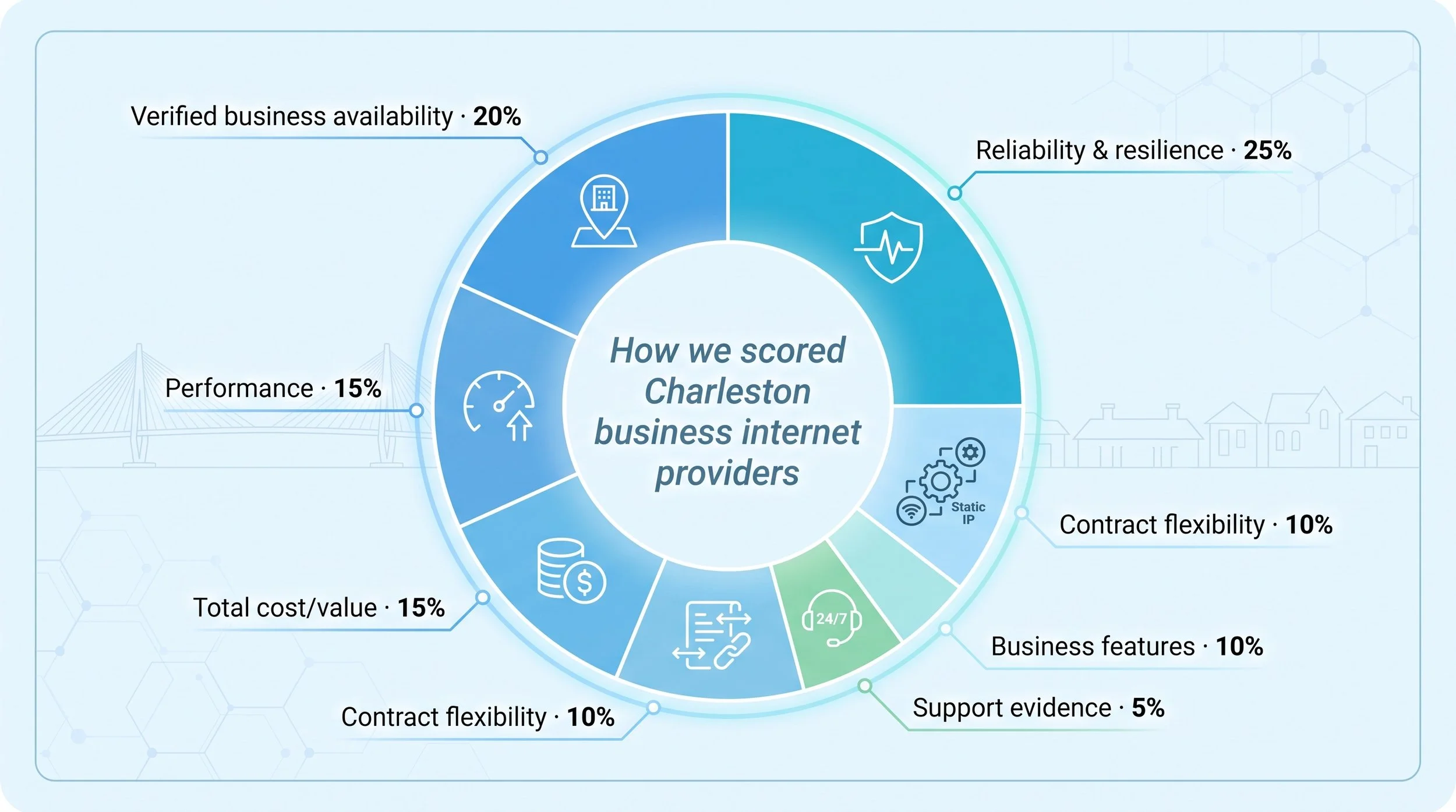
Reliability and resilience – 25 percent. We looked for written SLAs, automatic failover, battery backup, and whether backup preserves static IPs. (Example: cellular failover appliances usually swap in a carrier-assigned dynamic address, which can drop cameras and VPN sessions. Confirm the behaviour with any provider before you rely on it.)
Verified business availability – 20 percent. FCC Broadband Data Collection and provider address tools had to show that a circuit can be ordered at local business suites, not just nearby homes.
Performance – 15 percent. Sustained upload, latency, and symmetry outrank headline download speed because cloud backups and 4K reviews travel upstream.
Total cost/value – 15 percent. We combined promo rates, standard rates, equipment, static-IP fees, installation, and early-termination exposure. Transparent list pricing, such as AT&T Business Fiber’s published $60 to $285 ladder, earned bonus points.
Contract flexibility – 10 percent. We favored month-to-month terms, satisfaction guarantees, and price locks.
Business features – 10 percent. Static IP options, managed Wi-Fi, security bundles, and cellular backup improved scores.
Support evidence – 5 percent. We weighted 24/7 business support hours and documented mean-time-to-repair higher than anecdotal forum threads.
Official broadband labels, SLAs, and state-map data always outrank user commentary. Reddit or Nextdoor complaints revealed pain points but never overrode a signed agreement.
1. WOW! Business: Best for flexible local packages
WOW!’s network covers many Charleston business corridors, offering tiers up to 1.2 Gbps down / 60 Mbps up and an up-to-5-gig symmetrical tier at lit addresses. The Charleston, SC business internet page highlights a 60-day satisfaction guarantee (exclusions apply), a contract-term price lock, free installation, 24/7 U.S. support, and even a three-month free-modem promo, all concrete perks that back up the brochure copy.
Beyond bandwidth, WOW! lets you add Static IP ($14.99/mo), Whole-Business WiFi ($19.99/mo), voice lines, and Wireless Internet Backup ($44.99/mo, Cradlepoint E100 with optional 8-16-hour battery) on one invoice, a relief for cafés, retailers, and small offices that would rather avoid multiple vendors.
The footprint is worth reading rather than taking on trust, because WOW! prints it. The Charleston business page publishes twelve ZIPs: 29405, 29406, 29407, 29412, 29414, 29418, 29420, 29456, 29464, 29466, 29483 and 29485. That spans the peninsula, West Ashley, Mount Pleasant, North Charleston, Summerville and Goose Creek. If you run a King Street storefront and a North Charleston warehouse, check both against that list before you shortlist anyone, because a second address twelve miles away can produce a completely different set of options.
One thing to pin down before you sign: LTE failover appliances in this class typically hand the network a carrier-assigned dynamic address rather than carrying your wireline static IP across the switchover, so cameras, VPN tunnels and remote-desktop sessions can drop the moment failover fires. WOW! does not publish the addressing behaviour of Wireless Internet Backup either way, so ask the rep directly and get the answer in writing. The failover keeps card payments alive; preserving inbound services usually takes a dual-WAN firewall in front of it.
Where WOW! fits best
Buildings on the existing cable plant that cannot yet order higher symmetrical speeds.
Shops that want internet, Wi-Fi, and voice bundled under one provider.
Managers who value a contractual safety net but do not need enterprise DIA pricing.
Smart questions for sales
Is the quoted circuit cable, the up-to-5-gig symmetrical tier, or dedicated DIA?
What upload speed and SLA apply to that exact tier?
Will Wireless Internet Backup keep my static-IP devices online, or do I need extra hardware?
WOW! advertises 600 Mbps from $65.99/mo (with 1.2 Gig just $5/mo more). Remember that published business pricing requires a 1- or 3-year term agreement (with an early termination fee of 75 percent of remaining monthly charges) and that prices exclude taxes, fees, and equipment. The free modem is for 3 months only on 300 Mbps+ plans, so ask for a full, itemized quote before you sign.
2. AT&T Business Fiber: Best for symmetrical fiber performance
If upload speed matters as much as download, AT&T Business Fiber should be your first quote. The shared-fiber lineup starts at $60 per month for a 300 Mbps/300 Mbps tier with no annual contract, data cap, or equipment fee, and it scales to 5 Gbps symmetrical at $285, according to the AT&T Business website. Add an eligible AT&T Business wireless line and the 300 tier drops to $30.
AT&T advertises 99.9 percent network reliability and issues bill credits if downtime breaks that target. Clinics, creative studios, and POS-heavy restaurants value a written remedy more than a generic uptime banner.
A 30-day risk-free guarantee lets you cancel shared fiber without penalty, and installs often finish in one to two days when the ONT is already in place. Need backup? A plug-in wireless gateway can fail over automatically, but it switches to dynamic IP and may slow after 250 GB, so plan static-IP workloads or camera feeds accordingly.
Points to confirm with sales
Will the address checker return fiber, or will the rep pivot to legacy DSL?
What mean-time-to-repair applies to shared fiber versus a dedicated internet circuit?
Does the promo gift card offset installation, or is install already free?
Where construction is required, run temporary 5G backup until the light turns green. Once live, AT&T’s contract-free, symmetrical service sets the performance bar every other Charleston business internet provider has to clear.
3. Comcast Business: Best for broad wired availability
Much of downtown Charleston, including many aerial lines along King Street, sits on Comcast’s coax plant, so the company is often the immediate fallback when fiber is not on-net or when you want a physically diverse second path. Local cable tiers reach 2 Gbps down, but the upstream is the catch: Comcast does not publish a single upload figure for business cable, and on older plant it can top out around 35 Mbps. That is fine for Teams calls and retail traffic and slow for 4K uploads or overnight cloud backups. Always ask the rep for the exact upload on your quoted tier, because marketing pages spotlight download only.
Comcast’s commercial bundle can still make sense. Static-IP blocks, Connection Pro cellular failover, and one portal for Wi-Fi management across locations attract multi-site operators who value national consistency even if the Charleston loop is “only” cable. Remember that the 99.9 percent SLA you see in Comcast Dedicated Internet literature does not apply to standard coax service unless it is written into your order.
Questions to pin down
Is Connection Pro included or an add-on?
Is the “fiber-powered” offer true fiber to the suite, or DOCSIS over coax?
What is year-two pricing once promo credits expire?
Will the cable path share a conduit with any planned fiber install?
If fiber is six months away but Comcast can light a 12-month cable term this week, starting on coax and adding fiber later keeps workflows moving without inflating costs.
4. IQ Fiber Business: Best for transparent fiber pricing
Most providers hide true cost in footnotes, but IQ Fiber posts it on the homepage: $150 for 1 Gbps or $250 for 5 Gbps, with taxes, equipment, installation, and managed Wi-Fi already included, and no contract or early-termination fee. Up to five static IPs come with the 5 Gbps tier, per the IQ Fiber website.
That clarity helps when you forecast cash flow or split a bill across tenants. Since opening a Charleston operations center in May 2026, IQ Fiber now dispatches local field techs and spare parts instead of bringing them from Jacksonville.
The company advertises 99.99 percent network availability, but read the order form to confirm that credits back the target. Even without a formal SLA, the flat price plus included Wi-Fi, with separate SSIDs for POS, staff, and guests, lets small teams run a reliable network without hiring an IT vendor.
Coverage is still the catch. If the checker says “coming soon,” reserve your spot but keep a cable or AT&T line active. When the light turns green, switching is painless because you never locked into a long-term contract.
5. Home Telecom Business: Best local fiber provider
Home Telecom is headquartered in the Lowcountry and runs its own fiber network across parts of Berkeley, Charleston, and Dorchester counties. Where service is available, especially on Daniel Island and the northern metro fringe, the company can deliver up to 5 Gbps symmetrical shared fiber with local sales, installation, and 24/7 support, according to Home Telecom materials.
Local control shows in the process. Field techs know palmetto-root conduits and historic-district easements, so dispatches and spare parts stay close to Charleston rather than another state.
Pricing, static-IP blocks, restoration targets, and construction charges are all quote required. The upside is flexibility: Home Telecom often negotiates contract length and bundles voice or security services at rates the national carriers will not match.
Good reasons to request a quote
Your address sits outside WOW! or Comcast coverage but appears “serviceable” on the Home Telecom map.
Face-to-face support and fast truck rolls matter more than a national brand logo.
You need symmetrical speed for creative uploads, medical imaging, or off-site backups yet cannot justify dedicated-internet pricing.
If fiber conduit already reaches your parking lot, Home Telecom pairs enterprise-class bandwidth with small-town responsiveness and becomes a strong Charleston business internet option.
6. Spectrum Business: Best no-contract cable where available
Spectrum’s core offer is month-to-month service. For pop-ups, seasonal retailers, or tenants on short leases, that zero-term option beats signing a three-year fiber contract.
Charleston coverage is uneven, but where the plant is serviceable Spectrum’s business ladder starts at 500 Mbps down / 35 Mbps up for $65 per month, with 750 Mbps at $95 and 1 Gig at $115. Plan overnight windows for off-site backups, or pair Spectrum with a symmetrical fiber primary, because uploads plateau around 35 Mbps at every tier.
The trade-off for flexibility is hardware cost. Confirm modem, Wi-Fi, and static-IP fees up front, and remember the uptime guarantee in Spectrum’s dedicated-fiber literature does not apply to standard business cable; best-effort credits begin only after prolonged outages.
When Spectrum makes sense
You need internet this week and the landlord will not approve a multi-year contract.
A fiber primary is in place and you want an inexpensive coax backup entering through a different path.
You are testing a location and cannot risk an early-termination fee if sales disappoint.
Start month-to-month, measure real-world performance, and decide later whether to keep Spectrum as the primary circuit or shift it to backup once a higher-upload option reaches your door.
7. T-Mobile Business Internet: Best for rapid setup or backup
When you need connectivity today, T-Mobile ships a 5G gateway that boots in minutes, grabs a cell signal, and hands out Wi-Fi or Ethernet, so no trench crew is required. For pop-up retail, construction trailers, or restaurants stuck in permitting limbo, that speed to service can keep the “open” sign lit instead of forcing cash-only work-arounds.
T-Mobile publishes no committed speed pair for fixed wireless, so throughput turns entirely on signal quality and tower load at your address. It is usually fine for cloud POS, VoIP, and video calls, but run your own peak-hour tests at the exact spot the gateway will sit before betting payroll on it. The plan is technically unlimited; however, traffic may be deprioritized for heavy users during congestion, and some pooled data plans add per-gig charges after an allotment, according to T-Mobile business documentation.
Static IPs are optional. Ask for the business tier with public IPv4 if cameras or VPNs need inbound reach; otherwise, carrier-grade NAT can block remote-desktop sessions.
Where T-Mobile fits
Automatic failover: plug the gateway into a dual-WAN router to cover cable cuts.
Temporary primary: power new sites while waiting weeks for fiber construction.
Mobile events: festivals, food trucks, or off-site meetings with no wired backhaul.
Bring a UPS: cell towers often stay online, but on-prem gear still needs power. Test failover quarterly, and you add a solid resilience layer for less than a single dinner shift’s credit-card fees while keeping your Charleston business internet running.
8. Verizon Business Internet: Best wireless backup with static-IP support
Verizon LTE or 5G Business Internet fills the gap T-Mobile leaves open by offering a public static IPv4 option for fixed wireless. If your VPN concentrator, camera system, or remote-desktop gateway cannot sit behind carrier-grade NAT, Verizon is a straightforward cellular pick for Charleston business internet needs.
Verizon publishes 5G Business Internet in 100, 200 and 400 Mbps download tiers, and which one your address supports depends on tower proximity and indoor signal, so run peak-hour tests at the exact spot the gateway will sit before you commit to a tier. Business plans ride on priority data, so speeds stay steadier during stadium events and holiday weekends.
You can order Verizon as a dedicated backup circuit or a stand-alone link, but verify that static-IP provisioning is available on your chosen plan before you sign; some entry tiers omit it.
Where Verizon fits best
Dual-WAN firewalls that need a public IP when fiber drops.
Mobile clinics or field offices that rely on inbound VPN connections.
Retail sites seeking cellular failover and already using Verizon for voice or fleet lines.
Charleston’s Verizon landing page still references Fios, yet Fios fiber stops states away. Treat this strictly as fixed-wireless service and check tower proximity, indoor signal, and antenna placement to get the reliability you are paying for.
Honorable mentions and specialist options
Charleston’s connectivity menu reaches beyond the eight headline providers. If your address sits on the metro fringe or you run pop-up operations away from the fiber grid, these niche choices can close the gap.
Starlink now averages sub-40 ms latency in U.S. Speedtest Intelligence reports, and its uploads outpace older geostationary satellites. Weather fade, hardware that runs several hundred dollars, and service priced per data bucket still keep it best suited for rural sites, construction trailers, or disaster-recovery kits rather than everyday offices.
Dedicated Internet Access (DIA) from carriers such as AT&T, Comcast, Spectrum Enterprise, Segra, Lumen, and Zayo delivers uncontended bandwidth, written SLAs, and proactive monitoring. The trade-off is 60- to 120-day installs, possible five-figure construction costs, and multi-year contracts. Clinics, manufacturers, and trading desks that lose thousands per minute of downtime should request a DIA quote alongside shared fiber.
Property-specific networks like Hotwire, TPx, and condo Wi-Fi operators can provide gig-plus speeds inside limited footprints. If a leasing office says the building is “pre-wired,” confirm static-IP support, business-traffic terms, and service-credit SLAs before giving up riser rights.
Satellite options such as Viasat or Hughesnet blanket almost every square mile but carry latency over 500 ms and modest upload caps. Treat them as rural backup when fixed wireless is unreliable.
Combine these tools - a fiber primary, cable or 5G backup, and perhaps a satellite standby kit - and your Charleston business internet can stay up through the next summer storm or surprise fiber cut.
Best provider by Charleston business type
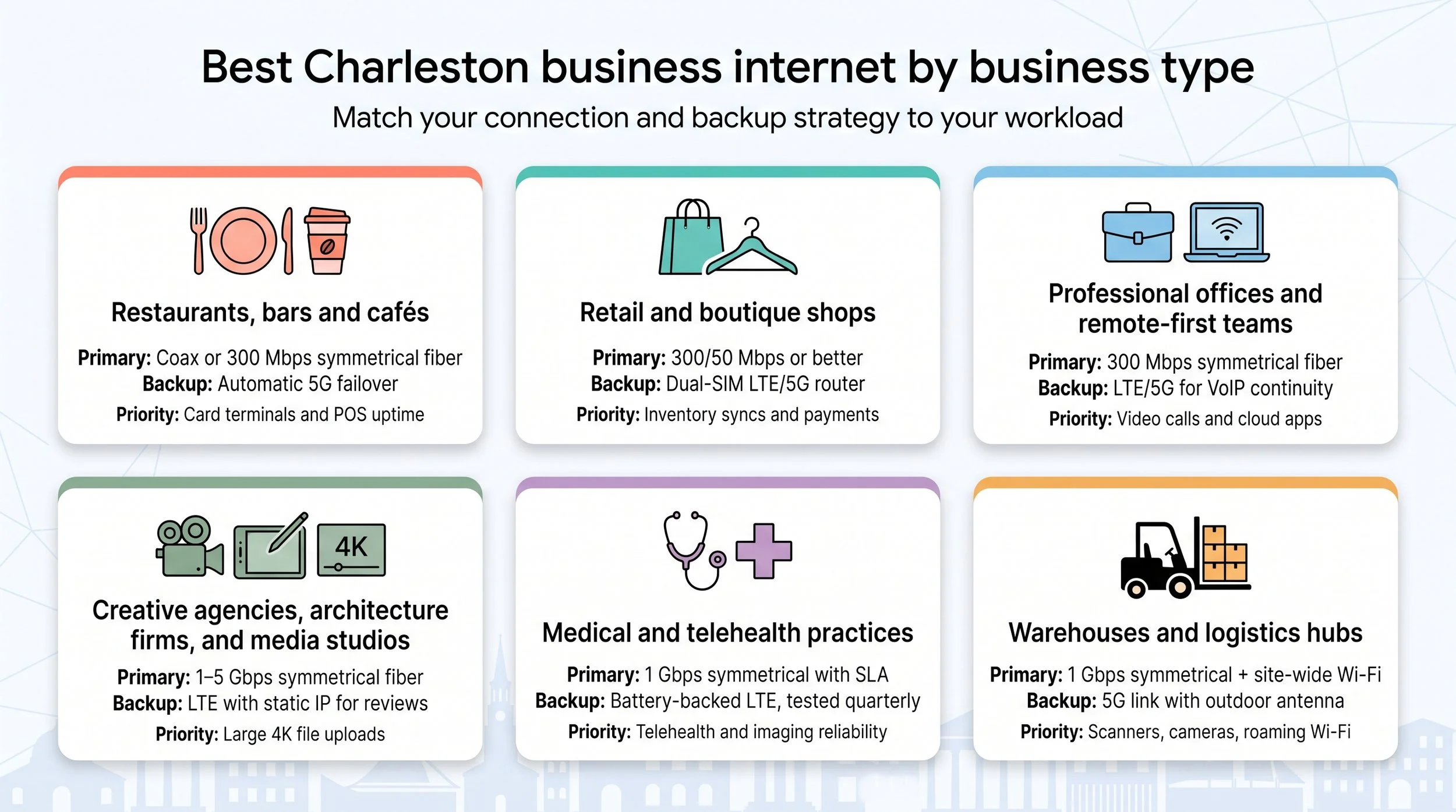
Restaurants, bars and cafés
Cloud POS, online orders, and table-side payments all share one pipe. A dual-link setup works best: a primary coax or shared-fiber line (WOW! cable or AT&T Business Fiber are common downtown) plus automatic 5G failover from T-Mobile or Verizon. Prioritise upstream traffic: security cameras, DoorDash tablets and nightly backups quickly eat a 50 Mbps upload cap, so ask whether AT&T 300/300 reaches your address before you settle for a coax tier. WOW! advertises symmetrical speeds up to 5 Gig on its Charleston page without publishing a price for that tier, so if you want it, make the rep quote it in writing alongside the 600 Mbps and 1.2 Gig rates. Segment networks with separate SSIDs for POS, guests, and cameras using managed Wi-Fi from WOW!, IQ Fiber, or Home Telecom.
Retail and boutique shops
Steady upstream bandwidth prevents slow inventory syncs and card declines. Aim for at least 300 Mbps down / 50 Mbps up. WOW! cable or Spectrum’s no-contract cable meets the floor, but switch to fiber - AT&T 300/300 or IQ Fiber 1 Gbps - when the address qualifies. Add a dual-SIM cellular router that pulls both T-Mobile and Verizon; the hardware costs less than a day of lost sales. Modern gateways (IQ Fiber managed Wi-Fi, Comcast Business WiFi Pro) let you spin up separate payment, staff, and guest lanes in minutes.
Professional offices and remote-first teams
Email seems light, but simultaneous video calls and cloud drives strain upstream quickly. Start with symmetrical 300 Mbps fiber (AT&T contract-free works city-wide; IQ Fiber’s 1 Gbps adds headroom). Cable is a fallback only if you pair it with LTE/5G failover, because partners notice the first dropped VoIP packet. Upgrade to Wi-Fi 6 access points and turn on QoS for video and voice; most provider gateways include simple toggles.
Creative agencies, architecture firms, and media studios
A 30-second 4K export can top 4 GB, so symmetrical gigabit is the entry ticket. IQ Fiber’s flat-rate 5 Gbps often costs less than cable plus static-IP bundles; where unavailable, choose AT&T’s 1–5 Gbps shared fiber or a Home Telecom business fiber circuit. Shared fiber latency hovers near 4 ms to local cloud nodes, versus about 20 ms on coax, which can affect live colour sessions. Keep project storage on a VLAN or QoS-tagged segment, and budget a static-IP Verizon LTE backup so a client review never stalls mid-frame.
Medical and telehealth practices
Telehealth demands symmetrical fiber plus written restoration targets. AT&T Business Fiber at 1 Gbps or higher meets HIPAA traffic needs; add Dynamic Defense for pre-firewall threat scrubbing. Where AT&T is not lit, Home Telecom shared fiber or DIA from Segra/Lumen provides a sub-four-hour MTTR. Mount an LTE router with battery backup, wire it into the firewall, and test failover every quarter. Segment imaging, voice, guest, and IoT devices into separate VLANs to keep clinical data isolated.
Warehouses and logistics hubs
Barcode scanners and cameras need site-wide Wi-Fi and at least 1 Gbps symmetrical fiber. Comcast cable may cover the industrial park, but several forklifts streaming video can choke a 35 Mbps uplink. AT&T 1 Gbps fiber or Home Telecom business fiber paired with SD-WAN keeps pallets moving. Order a 5G backup from Verizon, mount an outdoor antenna on the steel siding, and run dual power circuits so one breaker trip does not silence everything. Design Wi-Fi with directional access points down long aisles and run quarterly roaming tests, because RF in a 40-foot steel box differs from an office.
How much speed does a Charleston small business really need?
Bigger numbers on a rate card feel safe, but many teams overbuy download and undervalue upload, latency, and failover when shopping for Charleston business internet.
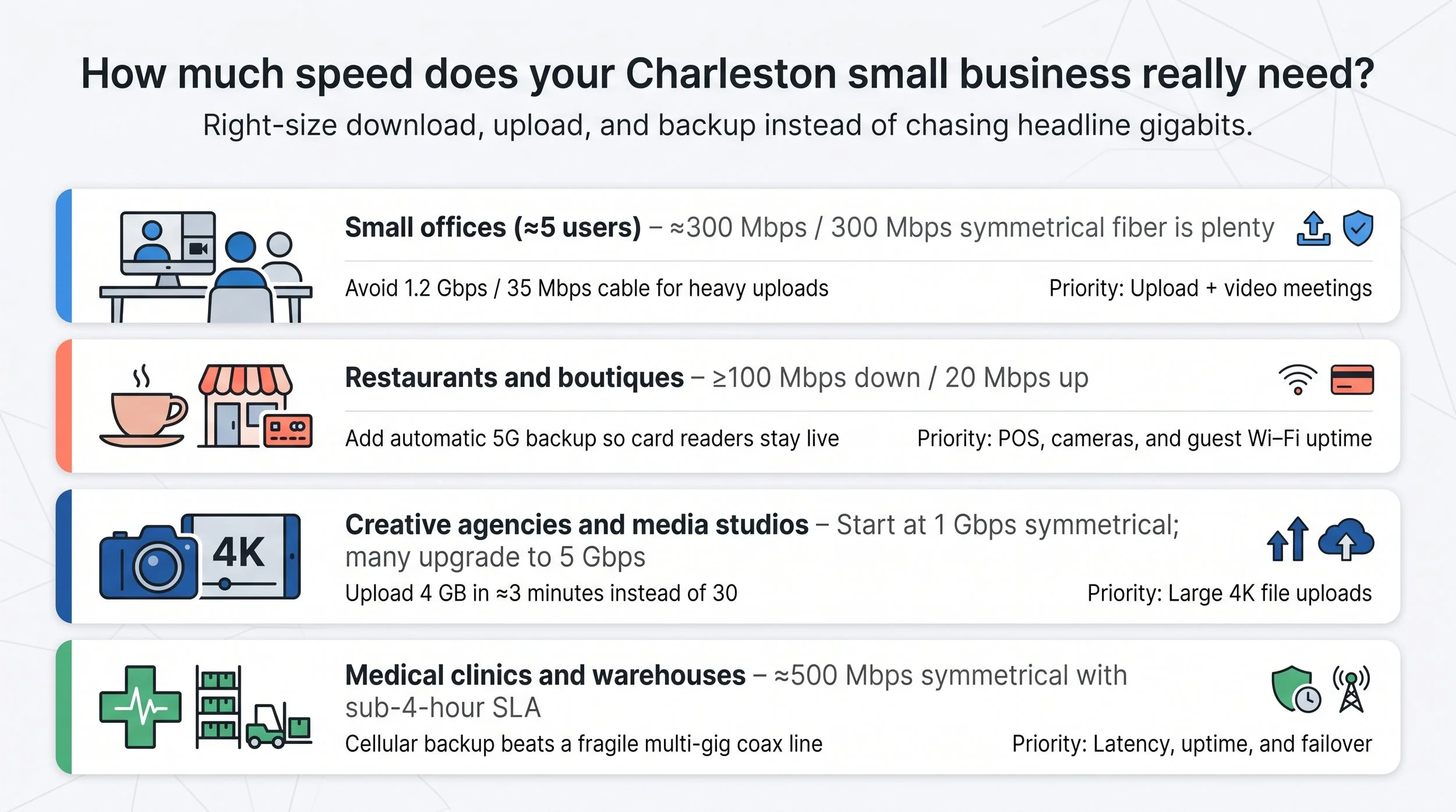
Small offices (≈5 users). A symmetrical 300 Mbps fiber plan is plenty for email, Google Workspace, and 4K Zoom calls. The same team on a 1 Gbps / 35 Mbps cable tier can feel slower once two people share screens.
Restaurants and boutiques. Budget at least 100 Mbps down / 20 Mbps up for cloud POS, cameras, and guest Wi-Fi, then add an automatic 5G backup so card readers stay live during an outage.
Creative agencies and media studios. Start at 1 Gbps symmetrical; many jump to 5 Gbps once render farms or BIM models kick in. Uploading a 4 GB file in 3 minutes instead of 30 minutes keeps editors billable.
Medical clinics and warehouses. Latency and uptime outweigh raw throughput. A dependable 500 Mbps symmetrical link with a sub-four-hour SLA plus cellular backup beats a fragile multi-gig coax line at shift change.
Remember: inside wiring, Wi-Fi design, and client hardware can still bottleneck a gigabit circuit. Match the plan to the workload, verify the upload figure, and secure a diverse backup path before chasing the next headline speed tier.
Building an outage-resistant setup
Even the best SLA cannot stop a contractor from cutting fiber on Meeting Street or a power blink that drops the neighborhood node. What matters is whether your card reader keeps working while repairs begin.
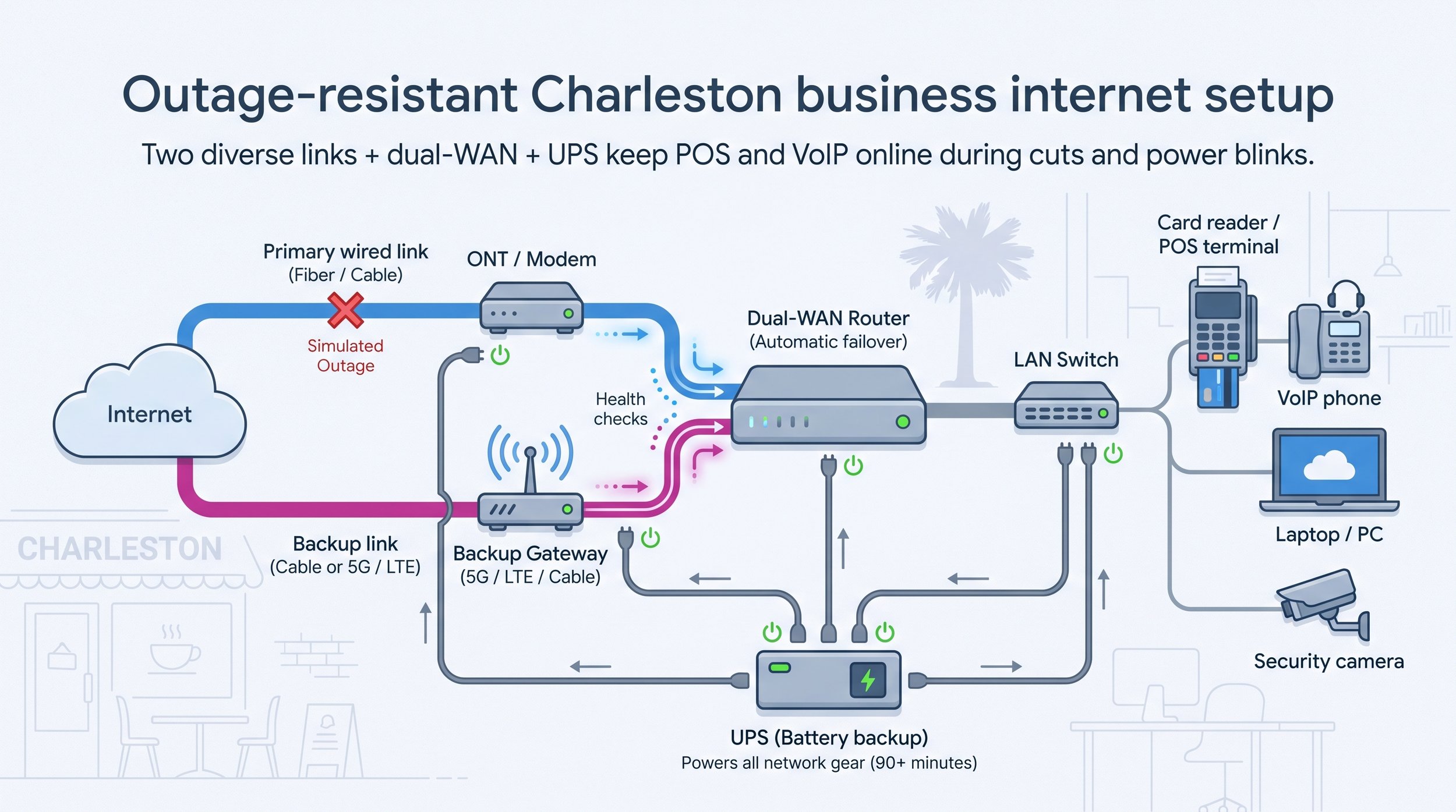
Choose two truly independent links. Mix carriers and media - fiber plus cable, cable plus 5G, or DIA plus cable - and, if possible, use different entrance conduits. AT&T Fiber with AT&T Wireless on the same buried path counts as a single point of failure.
Install a dual-WAN router. Continuous health checks, often one ping every 5 seconds, let the router shift traffic automatically. Entry-level models simply flip over; advanced firewalls maintain VoIP sessions and send an alert.
Add battery backup. Place the modem or ONT, cellular gateway, router, and critical switches on a UPS sized for at least 90 minutes of run time. A cellular failover link is useless if its power brick sits on a dead outlet.
Test every quarter. Pull the primary cable, run a card transaction, place a VoIP call, then restore the link and confirm sessions recover. Staff learn the drill, and customers never notice the switchover.
A diverse pair of circuits, a smart router, and a UPS turn an inevitable outage into a non-event for your Charleston business internet.
Buyer’s guide: questions to ask every sales rep
A glossy brochure hides more than it reveals. Copy these questions into one email and ask for written answers.
Service and performance
Is the last mile cable, shared fiber, dedicated fiber, or fixed wireless?
What are the typical (not peak) download and upload speeds?
Is traffic ever deprioritized, and is bandwidth symmetrical?
Reliability and backup
Does the plan include a contractual SLA or only a marketing uptime claim?
What restoration target or service-credit formula applies?
Is wireless failover automatic, battery-backed, static-IP capable, and subject to data caps?
Pricing and term
What is the standard monthly price after promotions end?
List every extra fee (equipment, static IPs, installation, taxes, recovery surcharges).
How is the early-termination fee calculated, and does the agreement auto-renew?
Construction and install
Is the suite already lit, or will construction charges apply?
What is the firm order-commitment date, and are penalties in place if that date slips?
Will inside wiring, riser access, or after-hours work add cost?
Technical fit
Can the gateway bridge to my firewall?
Is public IPv4 available now, and do you support IPv6?
Will CGNAT or security policies affect VPN, VoIP, or camera traffic?
Do the primary and backup links enter through different conduits?
A rep who answers everything in writing is a partner. One who dodges today can create surprises for your Charleston business internet tomorrow.
Hidden costs to flag
That eye-catching promo rate rarely reflects your three-year spend. Scan every proposal for these line items in writing before you call them “savings.”
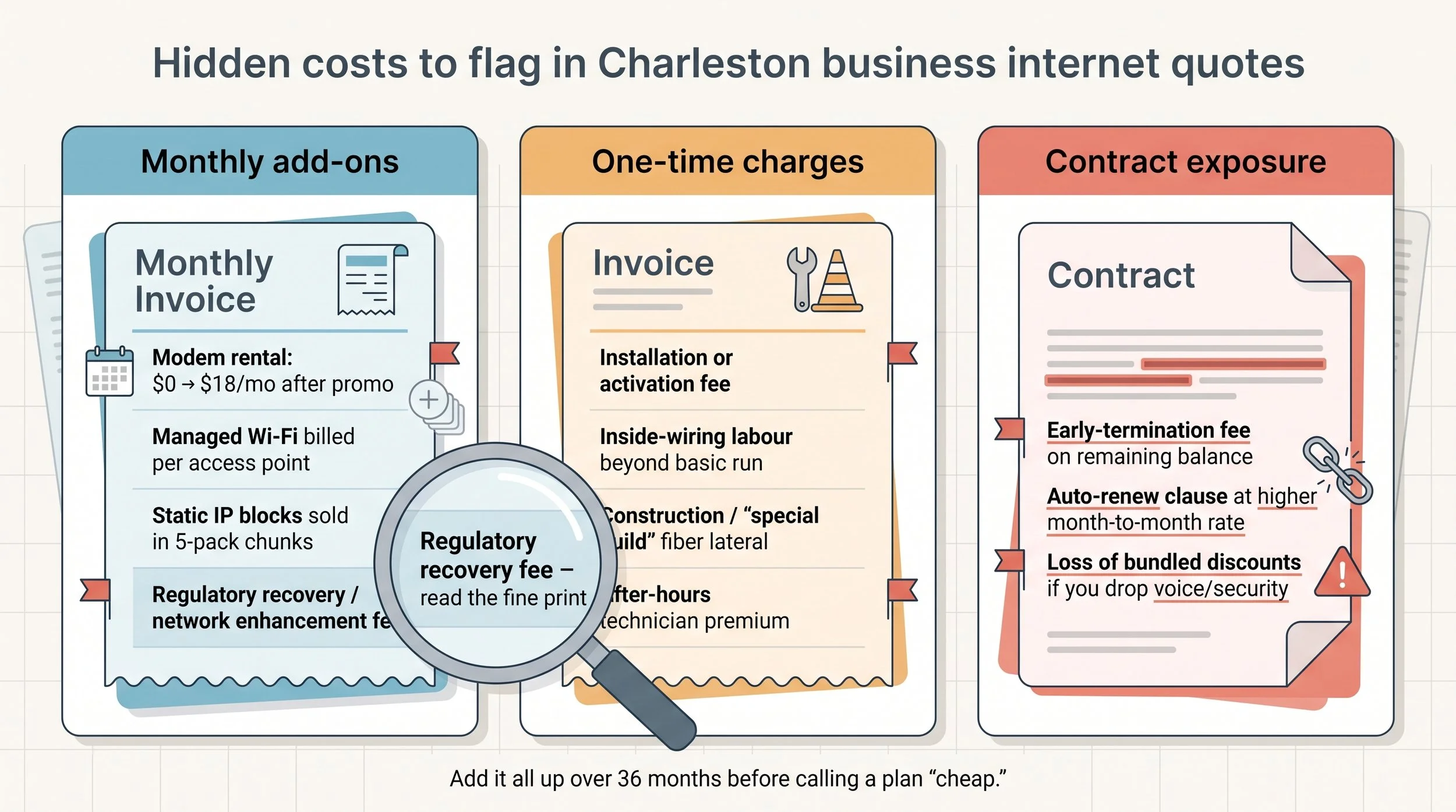
Monthly add-ons
Gateway or modem rental that rises from $0 to $15–$20 after promo months
Managed Wi-Fi or extra access points billed per unit
Static-IP blocks sold in five-address chunks even when you need one
Regulatory recovery or “network enhancement” fees that are not taxes yet still appear under “Taxes & Surcharges”
One-time charges
Installation or activation fees waived only with a multi-year term
Inside-wiring labour if the demarc is more than 150–200 ft from your rack
Construction or “special build” costs for new fiber laterals, often five figures
After-hours technician premiums for installs before 7 am or after 6 pm
Contract exposure
Early-termination fees that accelerate the entire remaining balance
Auto-renew clauses that flip fixed promo pricing to variable month-to-month rates
Loss of bundled discounts if you drop voice or security lines mid-term
Add these numbers over three years and the “cheapest” headline plan can out-cost a transparent, flat-rate competitor, so insist on a fully itemised quote for your Charleston business internet.
Frequently Asked Questions
What’s the “best” business internet provider in Charleston?
It depends on your exact address and workload. WOW! publishes a ZIP-level footprint and mix-and-match bundles, AT&T leads on symmetrical fiber, Comcast has the widest coax reach, and IQ Fiber posts the clearest all-in prices. Run each provider’s address checker first, then compare upload speed, failover options, and contract terms for your Charleston business internet.
Is business-class fiber available downtown?
Often, but not on every block. AT&T and Comcast have fiber nodes in many peninsula buildings, and IQ Fiber is building out West Ashley and Mount Pleasant from its new Herbert Street operations center. Confirm serviceability in writing because marketing maps can lag actual construction.
Can 5G fixed wireless serve as a primary link?
For low-demand pop-ups or temporary sites, yes. For daily operations, treat 5G as backup until you log peak-hour tests and review any deprioritization thresholds in the service guide.
Why pay more for business service when residential is cheaper?
Business plans include static-IP options, priority support, written SLAs, and automatic failover. Residential terms often prohibit commercial use and offer only best-effort restoration.
Does adding a second provider guarantee uptime?
Only if the two links are physically diverse (different carriers, media, and entrance conduits) and your router is set to fail over automatically.
How long does installation take?
Coax or 5G can activate within days. Shared fiber in a lit building typically installs in 2–3 weeks, while new laterals or dedicated DIA builds can run 30–90 days depending on permits and construction. Ask for a firm order-commitment date with penalties for missed milestones.
Conclusion and next steps
The “best” internet for a Charleston business is the circuit that delivers symmetrical speed, automatic backup, and transparent, written terms at your address.
Quick checklist:
Run each provider’s address checker to confirm service at your suite.
Short-list two wired primaries plus one physically diverse backup (different carrier and medium).
Request written quotes showing standard rate, static-IP fee, equipment, install, and early-termination risk over 36 months.
Compare upload speed, SLA, and restoration penalties side by side, and ignore headline download numbers.
Sign only after failover is wired, all gear sits on a UPS, and a quarterly test is on the calendar.
Follow this plan and a fiber cut on King Street becomes a brief status email, not a closed register. Your Charleston business internet stays open for business.