Tapo Matter Smart Plug Review
When you buy through links in this article, I may earn an affiliate commission. Learn More.
The sample device was purchased for this review.
Tested with scoring system 1.0
What do these scores mean?
Learn about our data-driven scoring system.
Pros
✔ Compact design doesn't block sockets✔ Responsive and reliable operation
✔ Polished energy montoring features
Cons
✔ Tapo app phones home a lot✔ Matter doesn't work when paired with Tapo app
The Verdict
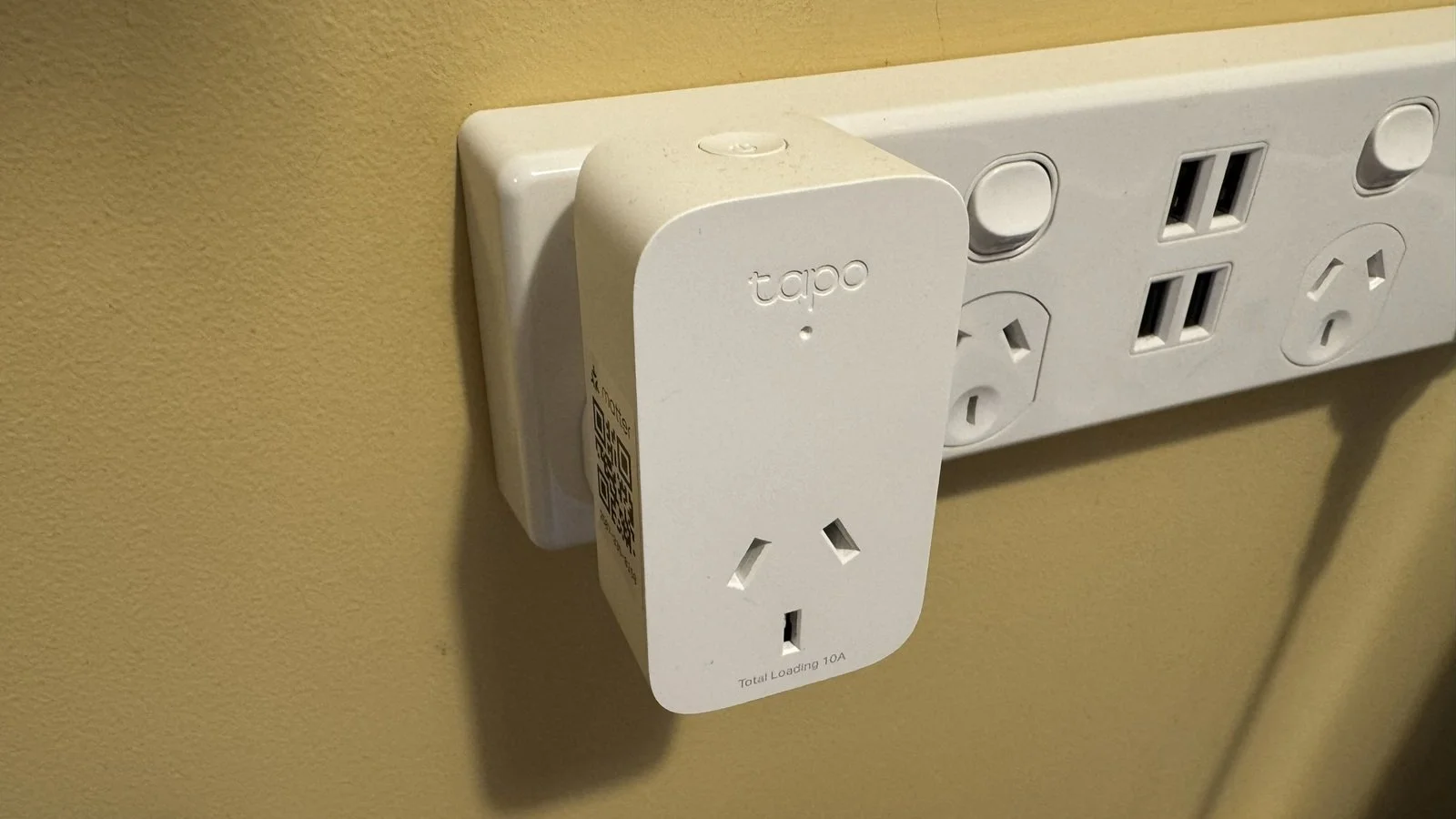
TP-Link Tapo has been in the smart home business for a while with their Tapo branded products and has established a fairly good reputation for reliability in that time. This new model smart plug support use both through the Tapo app and, importantly, through the Matter smart home standard. The Tapo app provides integration with Alexa and Google Home, but Matter opens up use in virtually every other smart home platform worth mentioning.
The plug itself pairs easily with either method thanks to integrated Bluetooth discovery and provisioning, this means Bluetooth is used during initial setup to both find the new plug and configure the Wi-Fi credentials so it can connect to your smart home. Tapo still only supports 2.4GHz here, but for a smart plug it doesn’t make sense to add the cost overhead for 5GHz.
During my testing, this smart plug has had no reliability issues and responds well to local commands, and as well as can be expected through third party apps and voice commands. The energy monitoring functionality is excellent, and provides easy access to long term usage data in the Tapo app that can be drilled down into, and exported if you so choose. With the latest Matter version now supporting energy monitoring as well, you can make use of these features in smart homes that support this as well.
With all socket types using a design that doesn’t interfere with adjacent sockets, and with an excellent price tag, the Tapo Matter plug looks to be an excellent choice for any smart home.
Plug Types: UK, AU, US
Connectivity: Wi-Fi
Price Segment: $$$$$
Test Results
Each smart plug I review is put through a series of repeated test cycles over a 30-day period. These tests give me 11 data points that make up the 7 overall category scores above. These scores rate each smart plugs key performance requirements like responsiveness, reliability, energy monitoring and the overall user experience.
Here’s how this smart plug ranks compared to the average of others I’ve tested:
| Data Point | This Model | Average Score |
|---|---|---|
| Setup Experience | 8.7 | 7.1 |
| Response Time | 8.9 | 9.3 |
| Native App | ||
| Third-party | ||
| Voice Control | ||
| Automation | ||
| Energy Monitoring | 9.4 | 6.8 |
| Reliability | 10.0 | 9.9 |
| Retries | ||
| Reboots | ||
| Full Reset | ||
| Privacy and Security | 9.2 | 6.7 |
| Internet Usage | 6.9 | 9.8 |
| 28 day download | ||
| 28 day upload | ||
| App Experience | 7.8 | 5.9 |
The Basics
Tech Specs
Connectivity: 2.5 GHz Wi-FiLoad Rating 120V: 15A
Load Rating 220V: 10A
App Account Required: No (on Matter)
Energy Monitoring: Yes
Overload Protection: Yes
Outdoor Rated: No
Compatibility: Alexa, Google, Matter
Footprint (WxH): Varies by model
Notable Features:
- Schedules
- Child Lock
- LED toggle
- Flame Retardant
Tapo is the smart home brand of network equipment maker TP-Link. They’ve been in the smart home business for a while now but have stuck with limited ‘easy mode’ support for only Amazon and Google platforms for the most part. This smart plug changes that and is part of the Tapo brand’s wider embrace of the new Matter standard.
Matter brings broad support for any smart home platform or hub that supports the standard and will provide at least basic smart plug functionality. Matter is still growing and we’re seeing new device types and features being added every 6 months or so, but the individual smart home platforms need to add support for these latest versions, and they often lag behind to varying extents. This is important to note as Matter now officially supports energy monitoring, but that doesn’t mean you smart home of choice will.
All international versions of this plug are designed to avoid blocking adjacent sockets, which is also a nice change. While common in the US, other countries have had to deal with blockier designs from many brands, which Tapo has thankfully avoided here.
While Tapo has stuck with cheaper 2.4GHz Wi-Fi, they at least support WPA3 on this model, and the Tapo app has very comprehensive energy monitoring features, including the ability to set multiple time-of-use charging prices for accurate cost estimation. You’ll also get schedules, location-based auto off, child safety lock, and overload protection built-in.
Setup Experience
Using Matter makes the setup process very straight forward. You need only scan the Matter QR code with your smart home app of choice and allow the auto discovery service to find it. Discovery is done via Bluetooth, so there’s no messing with Wi-Fi setting to be done. These will be passed securely to the plug, and it’ll be up and running in seconds.
I did this initially in Home Assistant and experienced no issues. Alternatively, you can pair the plug with the Tapo app if you want to use it with the wider Tapo ecosystem specifically, or you want to set up Amazon or Google support using the traditional methods (or you don’t have a Matter capable device to host it). This also handles discovery over Bluetooth and it joined the app without issue. Of course, this method requires you have a Tapo app account.
Using the app ensures access to the excellent energy monitoring features, but you’ll be controlling the device over the internet through Tapo’s servers. Using Matter ensures no account is required, and all communication and control is completely local.
Responsiveness
The Tapo plug is very responsive across all categories, with the native app provided almost instant control. Jumping over to the Alexa app introduced some internet lag as all Alexa control has to go via their servers, but it was on par with other Alexa plugs. Alexa voice control similarly provided the expected response time, averaging 1.4 seconds from command to response.
These results give no cause for concern and are about as good as you could expect from any smart plug over Wi-Fi.
Energy Monitoring
The Tapo app’s native energy monitoring features are well designed and easy to use. You get a full year’s worth of data recording, with the ability to drill down to hourly usage figures on any given day. Finding specific dates is easy and you can simply swipe left and right on the graph to move between days or months. The calendar even has summary cost and usage data for quick reference so you can zoom in on days that had unusual consumption to see what’s going on.
Right on the main page for the plug you have the current days usage with the option to switch to the month figures without having to open the monitoring page, which is a nice quick view option. All this data can be exported easily from the graph view if you want to massage it in Excel or some other app for longer term record keeping.
What’s especially nice is the energy cost calculations. Where many smart plugs only give the ability to specify a single energy price, Tapo has full time-of-use support with the ability to define multiple time periods with different prices. You can define separate pricing for weekends as well as summer and winter schedules to make sure you have the most accurate estimate of cost. The only thing missing here is a forward estimate based on current usage patterns.
What’s especially nice about Tapo’s implementation is that it now supports the new Matter energy monitoring functions. This means that a smart home platform that supports the latest Matter version can access the energy consumption data without needing the Tapo app, which also means you don’t need to sign up for an account. Just pair the plug with your Matter smart home and you’re good to go.
The only catch here is that you need firmware version 1.3 or later. My test unit didn’t have that so I had to pair it with the Tapo app first to update, then I could reset it and pair it with Matter instead. I test this functionality in Home Assistant, and it worked perfectly right off the bat.
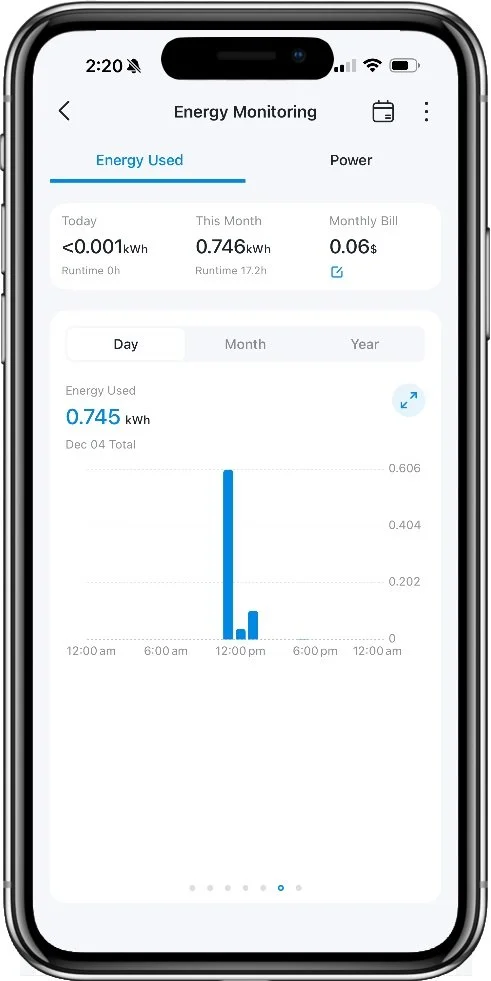
Energy graph is well designed
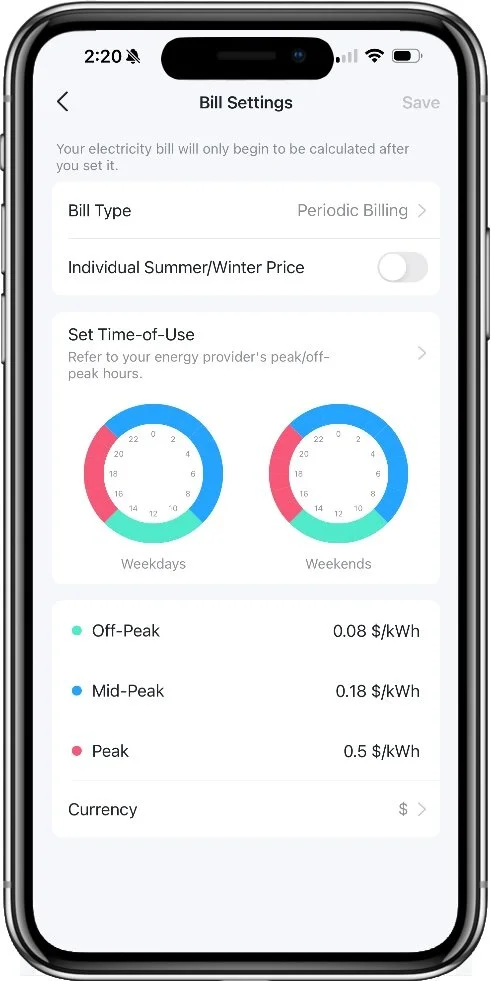
Comprehensive energy pricing is supported
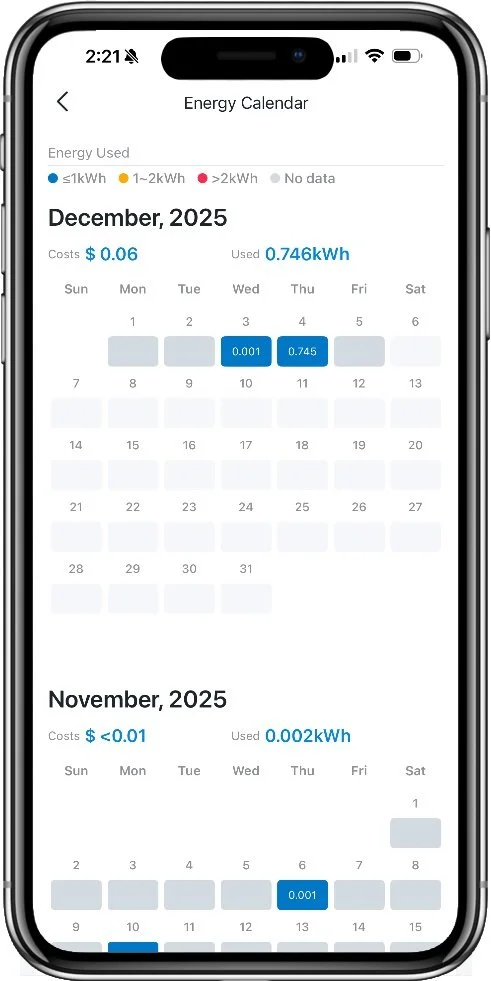
Date select graph includes basic data for ease of reference
Reliability
Tapo is a cheaper brand but having network roots has led to a proven track record of reliability when it comes to network connectivity. Over my 30-day test period I experienced no drop outs, delays or loss of connectivity. I wouldn’t expect to see these issues on a reputable brand like this, but this is nonetheless a good result.
Internet Usage
The purpose of this test is to measure how ‘chatty’ a smart device is when phoning home to the manufacturer’s servers. Some devices are particularly bad in this regard, and Tapo doesn’t fare too well here.
The Tapo app is quite noisy, and I measured a significant amount of traffic, particularly upstream from the plug over the 28 day measurement window. The traffic each week was very consistent, which may suggest this is energy monitoring related. This isn’t an excuse, however. The plug sent 4.1 and 4.5 MB of data back to Tapo each week, which is quite high compared to other brands with energy monitoring features.
Privacy and Security
The Tapo app is quite mature by this point, and as such offers a wealth of privacy and security controls for users to take advantage of. This includes the ability to set up two factor authentication. This will send a code via the Tapo app rather than txt message, which is better than most, and also provides a backup email option. Trusted devices are tracked and can be reviewed in the app, as well as your login history ensuring you can catch any lurking unauthorized users.
Devices can be securely shared individually by sending one-time invite links to other Tapo users, and these can be tracked and revoked at any time. You can also block specific users from sending you invites if someone is being a jerk, which is a nice consideration I don’t see often.
But this test is about more than account security. I’m also looking at how the device is managed over time. Firmware updates are an important protection against unauthorized access and abuse. Tapo takes care of this automatically by default, which is the best option. This avoids potentially critical security updates being missed for long periods of time and keeps things fresh without any user intervention.
App Experience
The Tapo app, being quite mature, has not suffered from the hodge podge growth of some smart home apps as more and more features were added. At least with respect to the smart plugs, the layout is clean and logical. Features often have explanatory text to describe what they do, which in cases like the Charge Guard feature come in very handy (this feature estimates when a device is nearing full charge based on its reducing power draw and turns it off early to conserve battery life).
Features are not buried in layers of menus, so it’s easy to browse and get a good feel for what options are on offer, and to find things quickly later. Common features like the energy monitoring and timer functions are front and center on the main page of the device, and any notices, announcement of changes, or security concerns are prominently exposed through a notification icon in the top right corner of the home dashboard.
Everything is responsive and there’s no weird translations or bad wording to be found. I also experienced no bugs or glitches of any kind while testing the smart plug.
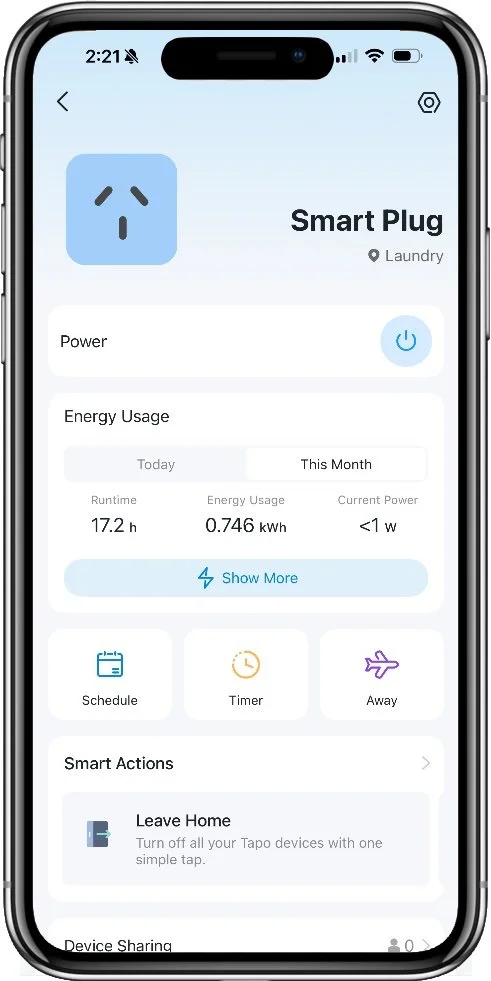
All the basics are right on the main page
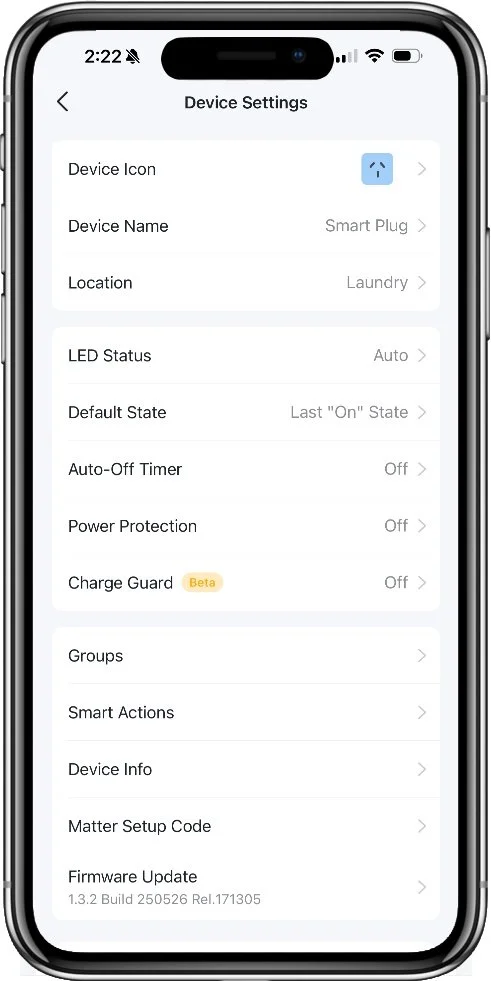
Settings are clear and intuitive
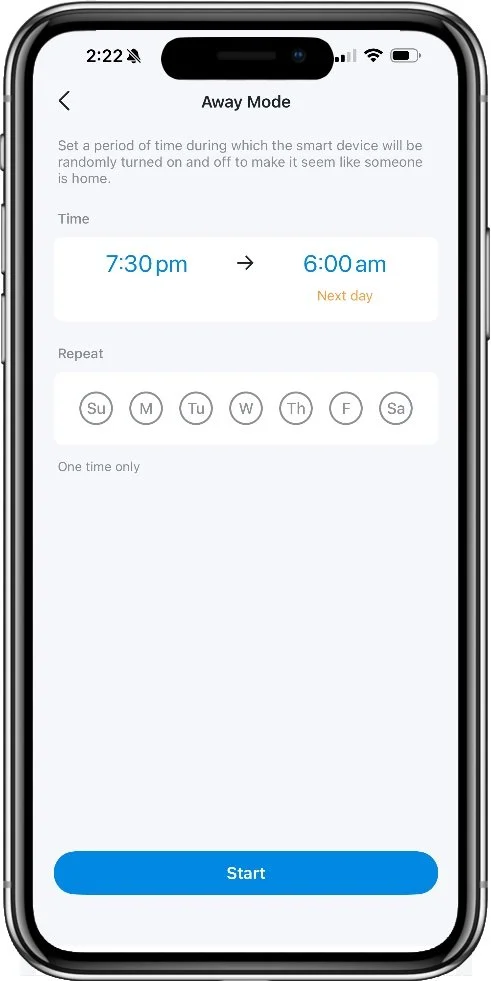
Extra features are explained clearly
Alternatives
Fast Wi-Fi

Meross MSS310
7.2 Overall Score
Meross has established itself as a reliable, low-cost smart home brand with a wide selection of smart products in the market now. The new MSS310 smart plug ipmroves on the pervious generation by enabling local Wi-Fi communication to improve responsiveness. This tweak pays off with impressive performance numbers coing close to a Thread-based smart plug, but with the wider compatiblity of Wi-Fi.
Awkward Spaces
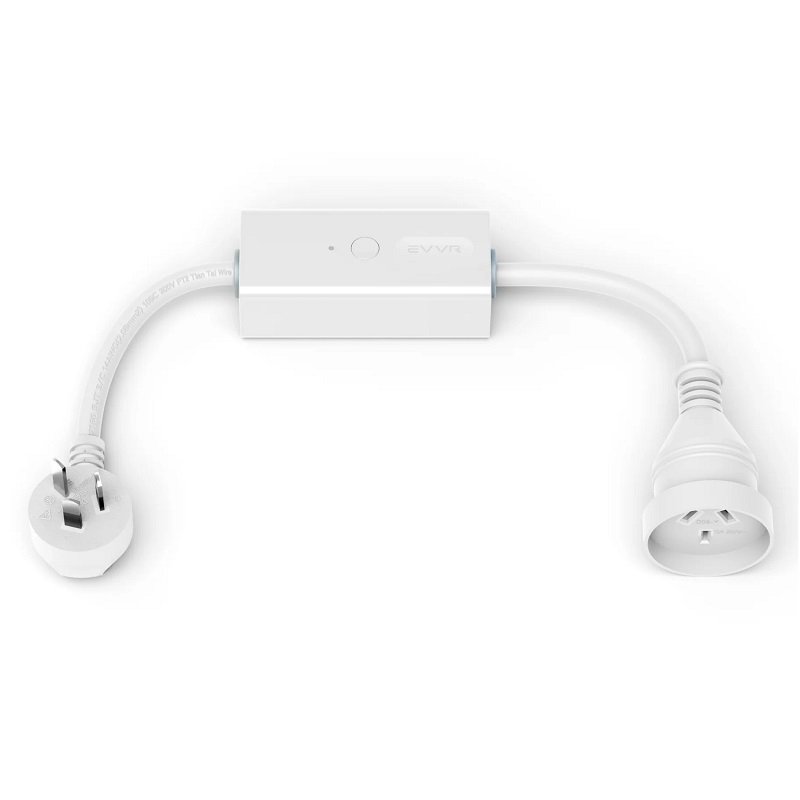
EVVR Smart Plug
7.7 Overall Score
An unusual design for a smart plug, the EVVR Smart Plug has a short tail on each end that allows for placement both in tight situations behind furniture, or where you don't want to block an adjacent socket. The enrgy monitoring is very basic, but the convenience might win the day for some.
Thread

Eve Energy
8.9 Overall Score
Eve has a long history with HomeKit users as a reliable, if pricey, option for a range of smart home devices. The latest Eve Energy is a full Matter device, with Thread connectivity for the ultimate in reliable, super fast operation. No internet connectivity means better privacy and security as well, and Eve's energy monitoring is pretty decent, although lacks some features.
Common Questions
Who owns Tapo?
Tapo is the smart home brand of Chinese network equipment maker TP-Link. Headquartered in Shenzhen, the company also has a US office in Irvine, California. This appears to have been used to attempt to conceal the Chinese connection to US consumers, causing the FTC to launch an investigation.
Do you need a Tapo account to use this smart plug?
No, if you have a smart home that supports Matter, with a suitable Matter controller/hub, you can use the smart plug directly without having to install the Tapo app or create a Tapo account. This eliminates the security risks of both having the plug communicate with Tapo’s servers and having another login potentially vulnerable to being stolen.
Does the Tapo Smart Plug support 5GHz Wi-Fi?
No, Tapo has continued to stick with only 2.4GHz Wi-Fi on most of their devices. This is likely due to cost and compatibility concerns, and the fact that a simple device like a smart plug gains no benefit from the use of 5GHz hardware. 5GHz is intended to improve wireless data speeds, but smart plugs have very minimal communication requirements so gain no measurable benefit from the improved throughput or response time. My tests found that local control of the smart plug over 2.4GHz is virtually instant.